Next.js 15 App Router vs Pages Router: A Performance Case Study
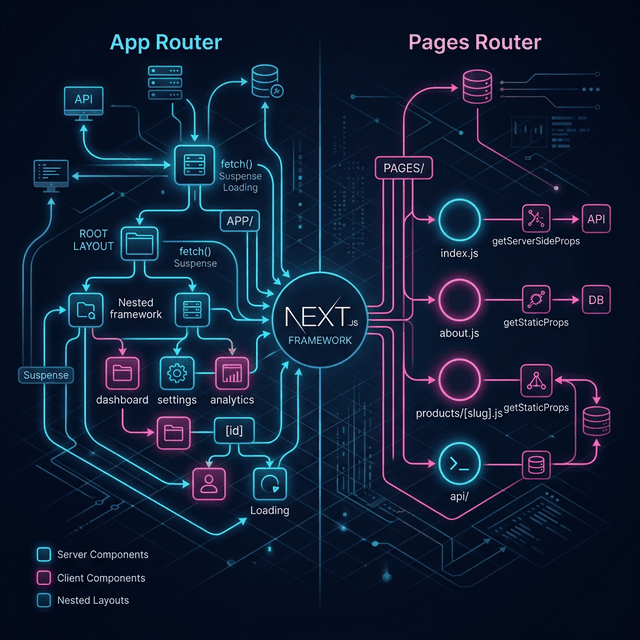
Should you migrate to the App Router in 2026? We break down the performance, LCP metrics, and architectural differences between Next.js 15's mapping paradigms.
It’s 2026, and the Next.js ecosystem is fully entrenched in the App Router paradigm.
If you’re stepping into a new role—or interviewing for a senior position—you will inevitably encounter this debate: "Why did Vercel push the App Router so hard, and is the Pages Router officially dead?"
While the Pages Router is still supported (for now), the architectural shift brought by Next.js 15 and React Server Components (RSC) fundamentally changes how we build for the web.
Here is a technical case study breaking down the differences, the performance implications, and why this matters for your next system design interview.
1. The Core Fundamental Difference: React Server Components (RSC)
The biggest shift between the Pages Router and the App Router isn’t routing; it’s rendering.
The Pages Router Approach (The Old Way)
In the <root>/pages directory, rendering happens roughly at the page level.
You define getServerSideProps or getStaticProps at the top of a file, export it, and Next.js passes that data down as props. The entire page is either statically generated or server-rendered, and then the entire page is sent to the browser to be "hydrated" (which means React boots up and attaches event listeners to everything).
The App Router Approach (The New Way)
In the <root>/app directory, components are Server Components by default.
This means the HTML for your components is generated on the server, and zero JavaScript is sent to the client for those components. You only ship JavaScript for components you explicitly mark with "use client".
- Interview Scenario: "Explain the difference between CSR, SSR, SSG, and RSC."
- The Crux: Server Components drastically reduce your JavaScript bundle size, improving Total Blocking Time (TBT) and Time to Interactive (TTI).
2. Granular Data Fetching and Caching
This is where the App Router truly shines in an enterprise environment.
Fetching in the Pages Router
If you had a dashboard with a User Profile sidebar and a Feed, you had to fetch all data at the top-level getServerSideProps inside pages/dashboard.tsx and prop-drill it down. If the Feed API was slow, the User Profile had to wait.
Fetching in the App Router
Data fetching is now co-located. The <Sidebar /> can fetch its own data, and the <Feed /> can fetch its own data independently, right inside the component body using native async/await.
// app/dashboard/feed.tsx
export default async function Feed() {
  // This fetches on the server!
  const data = await fetch('https://api.example.com/posts');
  const posts = await data.json();

  return (
    <ul>
      {posts.map((post) => (
        <li key={post.id}>{post.title}</li>
      ))}
    </ul>
  );
}
By wrapping <Feed /> in a React <Suspense> boundary, Next.js will stream the User Profile to the user immediately, while showing a loading skeleton for the Feed.
- Real World Proof: This granular loading pattern is heavily tested in Google Frontend Interviews where perceived performance is critical.
3. LCP and SEO Implications
Largest Contentful Paint (LCP) is the holy grail of Core Web Vitals.
App Router Win: Streaming.
Because the App Router natively supports React <Suspense>, you can stream critical above-the-fold content instantly (like a hero image or article text) while streaming slower, below-the-fold content later. This dramatically improves LCP scores, which directly impacts SEO rankings.
Pages Router Win: Predictability.
The caching layer in the App Router (the infamous aggressive default caching) confused many developers inheriting legacy codebases. The Pages Router's caching model, while less powerful, was simpler to reason about using straightforward revalidate flags in getStaticProps. Next.js 15 has significantly improved and simplified the App Router's caching heuristics, but the learning curve remains.
4. The Verdict: Should You Migrate?
Stick with the Pages Router if:
- You have a massive, legacy monolithic application generating millions in revenue, and the migration cost outweighs the bundle size savings.
- Your engineering team relies heavily on higher-order components (HOCs) that wrap entire pages.
Migrate to / Start with the App Router if:
- You are building a new application from scratch.
- You have highly dynamic, data-heavy dashboards where Streaming and partial hydration provide massive UX benefits.
- You want to leverage granular, nested layouts (where a persistent sidebar doesn't re-render when the main content changes).
How to Talk About This in an Interview
Interviewers don't want to hear you blindly praise a framework. They want to hear you discuss the trade-offs of the architecture. Mention how the App Router moves configuration from a centralized location (getServerSideProps) to decentralized component trees, and discuss the architectural implications of that shift.
If you are currently preparing, see how companies are adapting to these new paradigms by reading our latest Frontend Interview Experiences.